How Does Wplace Work? A Complete Step-by-Step Guide 2025
In the digital art revolution of 2025, millions of creators worldwide are asking the same question: How does Wplace work? This collaborative pixel art platform has captivated over 10.6 million users (as of September 2025) with its unique blend of creativity, strategy, and global cooperation. Understanding Wplace's intricate mechanics is key to mastering this digital canvas that spans our entire planet.
How Does Wplace Work? Understanding the Global Pixel Art Canvas
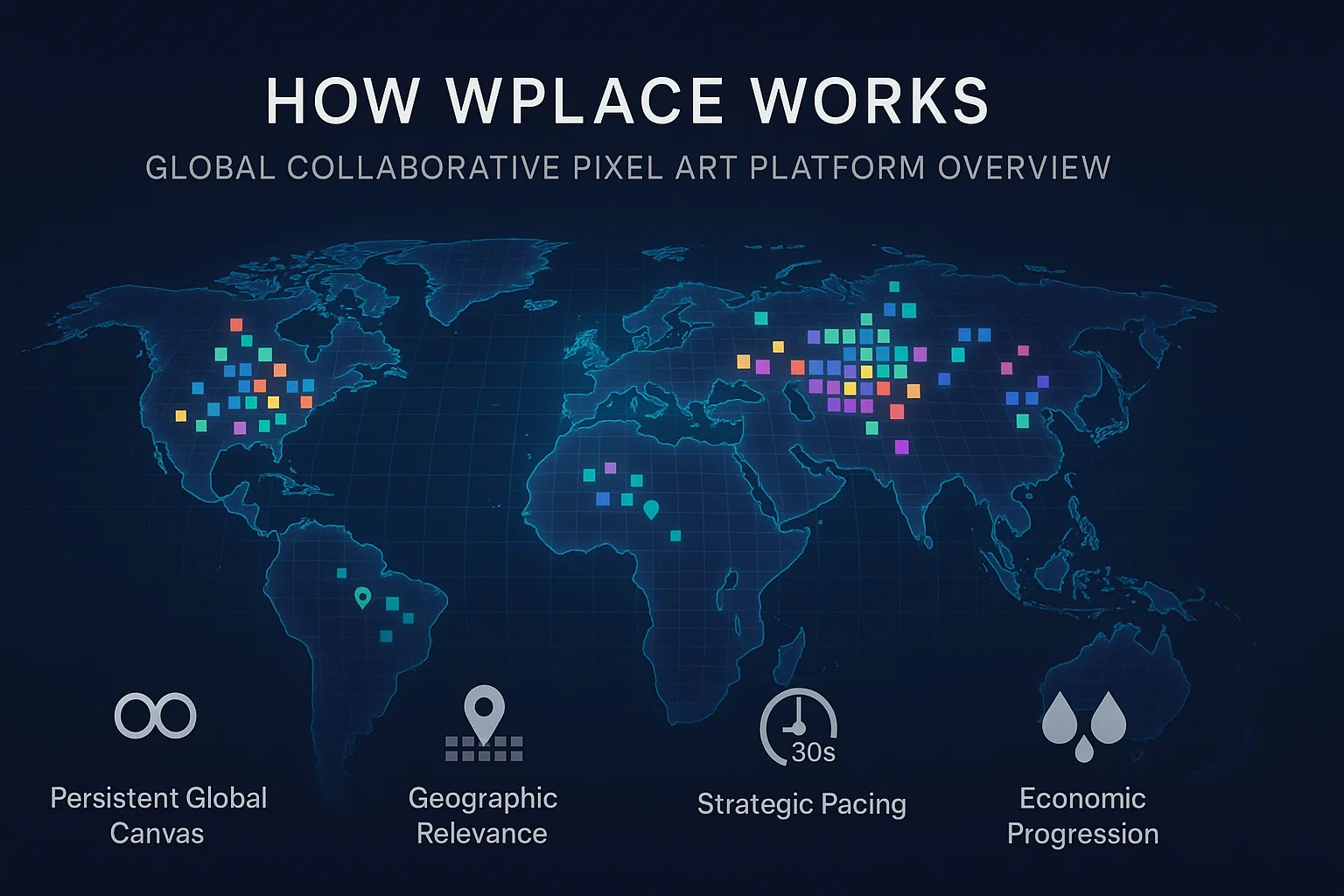
At its core, Wplace operates as a massive collaborative digital canvas overlaid on a global world map, where millions of users place individual pixels to create collective artwork. Launched on July 21, 2025, initially developed by Brazilian developer Murilo Matsubara and now operated by a team including co-founder Enzo Watanabe, this platform transforms the entire globe into a 4-trillion-pixel creative playground.
Unlike traditional art platforms or Reddit's periodic r/place events, Wplace combines several innovative concepts. (For a broader introduction to the platform, see our What is Wplace guide):
- Persistent Global Canvas: Currently operates as a long-term collaborative canvas with no announced reset schedule, though future format may evolve
- Geographic Relevance: Pixels correspond to real-world locations, making placement meaningful beyond aesthetics
- Strategic Pacing: A 30-second cooldown system ensures thoughtful collaboration over rapid consumption
- Economic Progression: Users earn "droplets" to expand their creative capabilities and unlock premium features
This unique approach has transformed digital art creation from individual expression into a global phenomenon where creativity meets geography, strategy meets community, and patience meets passion.
The Core Mechanics: Pixels, Cooldowns, and Collaboration

To master Wplace's mechanics, you need to understand three fundamental systems that govern every interaction on the platform.
Key Terms:
- Cooldown/Pixel Regeneration: Time-based system where pixels become available every 30 seconds
- Droplets: Platform currency earned through participation, used to purchase additional pixels, expand pool capacity, and access premium features (specific uses subject to current platform rules)
The 30-Second Cooldown System
The heartbeat of Wplace's gameplay is its iconic 30-second pixel regeneration cycle. After placing a pixel anywhere on the global canvas, users must wait exactly 30 seconds before their next pixel becomes available. This isn't a technical limitation—it's a deliberate design choice that:
- Prevents spam and low-effort content by requiring time investment for each pixel
- Encourages strategic planning as users must prioritize their most important placements
- Enables fair participation by ensuring no user can dominate through rapid-fire placement
- Promotes collaboration by making large projects require multiple contributors
The timer displays prominently in the interface, creating anticipation and encouraging users to carefully consider each placement.
Pixel Pool Mechanics
Each Wplace user begins their journey with a pixel pool (commonly reported as starting around 60 pixels, though this may vary with platform updates). This pool serves as your creative ammunition, with several key features:
Pool Expansion Through Engagement: As users place pixels and level up, their maximum pool capacity increases. Pool size limits expand based on participation level, with specific caps determined by current platform mechanics.
Strategic Resource Management: Unlike simple cooldown systems, the pool allows for burst creativity—users can place multiple pixels rapidly when inspiration strikes, then wait for regeneration during planning phases.
Droplet Enhancement: The platform's virtual currency, "droplets," can be spent to instantly refill your pixel pool or permanently increase its maximum capacity.
The 4-Trillion Pixel Canvas
Wplace's technical achievement lies in its massive 4-trillion-pixel interactive canvas overlaid on a global world map. To understand this scale:
- Each pixel represents approximately 125-130 square meters of Earth's surface (rough estimation based on Earth's total surface area, not official specification)
- Major cities can host intricate, detailed artwork with recognizable landmarks becoming creative focal points
- Zoom functionality allows users to work at different scales, from continental views to street-level precision
This geographic integration means pixel placement carries meaning beyond artistic choice—users often create culturally relevant artwork in their home regions or significant global locations.
Painting Process: From Click to Canvas
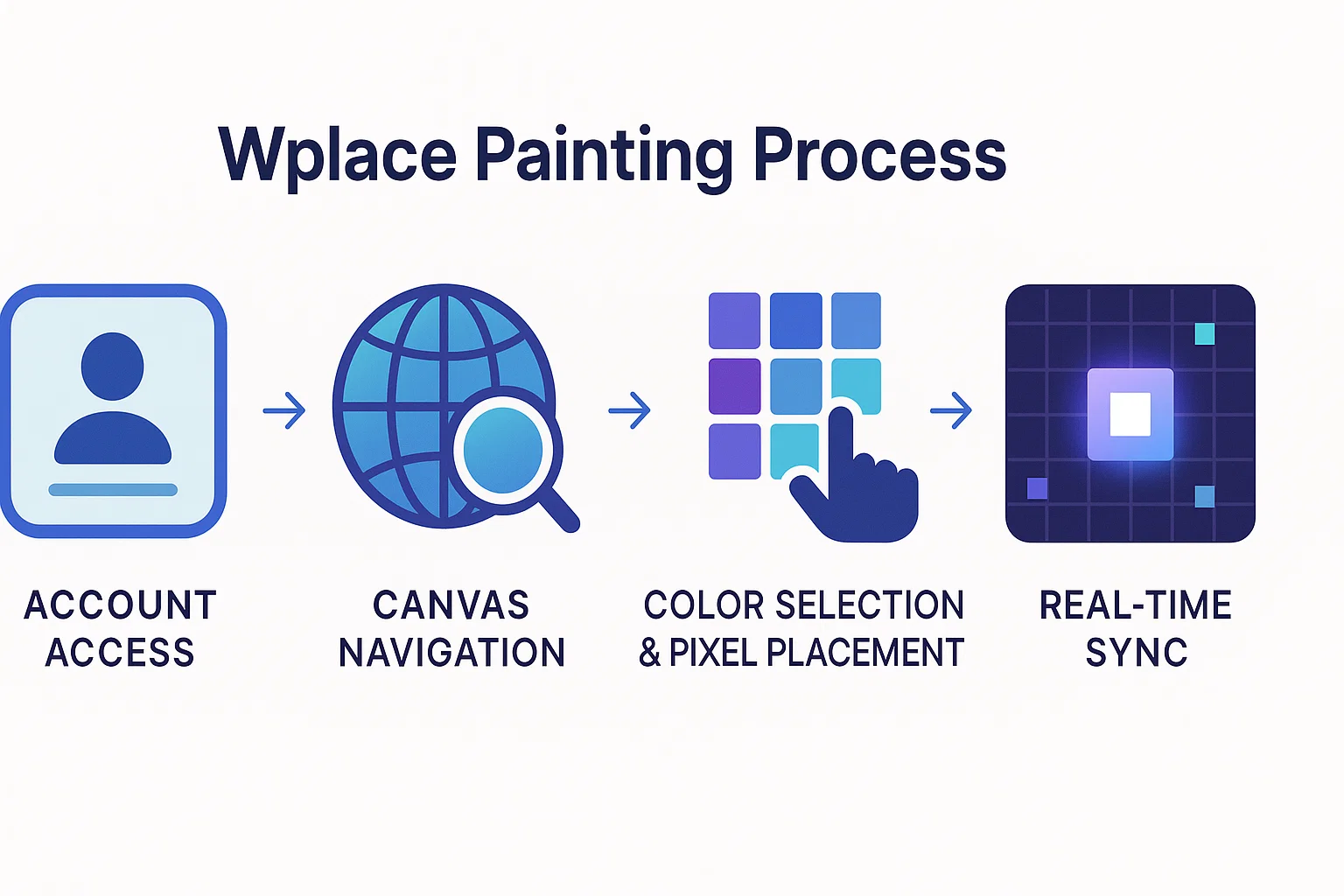
Understanding Wplace's painting process requires following the complete journey from creative vision to placed pixel.
Step-by-Step Pixel Placement
1. Account Access and Login Users access Wplace through web browsers or mobile applications (Wplace-related apps appeared in app stores around August 2025, though official app status should be verified through official channels). No advanced technical knowledge is required—the platform prioritizes accessibility while maintaining sophisticated functionality.
2. Canvas Navigation and Location Selection Using the integrated OpenStreetMap interface, users can:
- Navigate to any global location using search or manual scrolling
- Zoom to pixel-placement level (typically zoom level 10 and above)
- Bookmark favorite locations for quick access to ongoing projects
3. Color Selection and Pixel Placement The placement process involves:
- Selecting from the available color palette (free or premium colors)
- Clicking the desired pixel location on the canvas
- Confirming placement (pixels appear immediately for all users globally)
- Waiting for the 30-second cooldown before the next placement
4. Real-Time Synchronization Every pixel placement instantly appears for all global users, creating a dynamic environment where artists can respond to each other's work in real-time.
Color System and Palette
Wplace features a 63-color palette (community sources suggest 63-64 colors, subject to platform updates) strategically divided into accessibility tiers. For detailed color information and optimization strategies, check out our comprehensive Wplace palette guide:
Free Colors (31 colors): Immediately available to all users, covering essential hues for most artistic needs. These colors include primary and secondary colors, basic earth tones, and common shades for landscapes and characters.
Premium Colors (32 colors): Unlockable through "droplets," offering specialized shades, pastels, and accent colors for advanced artwork. Premium colors enable subtle gradients, skin tones, and detailed shading.
Droplet Economy: Users earn droplets by placing pixels, leveling up, and maintaining engagement. Droplets can be strategically invested in:
- Unlocking premium color access
- Expanding maximum pixel pool capacity
- Purchasing additional pixels or refills (based on current platform features)
- Purchasing cosmetic upgrades (profile pictures, country flags with 10% regional bonuses)
Mobile vs Desktop Experience
Desktop Advantages:
- Precise cursor control for detailed pixel work
- Larger screen real estate for complex project planning
- Advanced keyboard shortcuts and navigation tools
- Better performance with extensive zoom operations
Mobile Benefits:
- On-the-go participation during commutes or breaks
- Touch interface enables intuitive pixel placement
- Convenient on-the-go participation
- Access to the same core functionality as desktop versions
Both platforms maintain feature parity for core functionality, ensuring users can contribute meaningfully regardless of their preferred device.
Collaboration and Community Rules
A critical aspect of mastering Wplace involves navigating the complex social ecosystem that governs millions of simultaneous creators.
Overwriting vs Griefing
Legitimate Overwriting (Allowed):
- Artistic improvement: Enhancing existing artwork with better technique, detail, or color harmony
- Collaborative evolution: Building upon others' work with permission or community consensus
- Regional development: Creating new artwork in unused or abandoned canvas areas
- Cultural expression: Adding culturally relevant art to geographically appropriate locations
Prohibited Griefing Behavior:
- Mindless vandalism: Destroying established artwork without constructive purpose
- Offensive content: Placing inappropriate, hateful, or violent imagery
- Random noise: Creating meaningless pixel patterns over organized artwork
- Coordinated attacks: Organizing groups to deliberately destroy others' work
The community generally self-regulates through social pressure, but the platform includes robust reporting mechanisms for serious violations.
Team Coordination Strategies
Successful large-scale Wplace projects require sophisticated coordination:
Planning and Communication:
- Discord servers and community forums serve as popular coordination hubs for major projects
- Template sharing through community tools helps ensure accurate collaborative execution
- Time zone coordination enables 24/7 progress on international projects
- Role assignment divides large artworks into manageable sections for team members
Strategic Resource Management:
- Pixel scheduling coordinates team members' cooldown periods for maximum efficiency
- Color allocation ensures premium colors are used strategically for crucial details
- Defensive positioning protects completed sections while work continues elsewhere
Automated Tools and Restrictions
Wplace maintains strict policies against automation while supporting legitimate community tools. For complete details, see our Wplace rules and guidelines.
Strictly Prohibited (per platform Terms of Service and Rules):
- Automated bots and scripts that place pixels without human intervention
- Multi-accounting (using multiple accounts to circumvent limitations)
- Automated coordination tools that remove human decision-making from placement
Community-Created Tools (Third-Party):
- Overlay systems like Blue Marble and Overlay Pro for precise coordinate alignment
- Color conversion tools that help optimize artwork for Wplace's palette
- Template generators that create placement guides for collaborative projects
Note: These are community-made tools. Please review platform terms of service before use.
Violations can result in account suspension or permanent bans, making compliance essential for long-term participation.
Advanced Techniques and Tools
Advanced Wplace mastery requires understanding sophisticated strategies that separate casual participants from expert creators.
Template and Overlay Systems
Coordinate Precision with Community Tools: Professional Wplace artists use community-developed coordinate overlay tools to achieve pixel-perfect placement. Our template guide explains the "Top-Left X/Top-Left Y" (TL X/TL Y) coordinate system used in community tools, which allows teams to:
- Plan exact placement coordinates for complex artwork
- Ensure perfect alignment across multiple contributors
- Scale artwork appropriately for different zoom levels
- Maintain consistency when recreating reference images
Community-Approved Overlay Tools:
- Blue Marble: Provides geographic context overlays for location-relevant artwork
- Overlay Pro: Advanced template system with real-time coordinate tracking
- Wplace Extension: Browser enhancement offering placement notifications and reference guides
Color Conversion and Optimization
Strategic Palette Utilization: Converting artwork to Wplace's limited palette requires sophisticated techniques. Our color converter tool can help automate this process:
Dithering Methods: Creating perceived color variety through strategic pattern placement, enabling smooth gradients and complex shading within palette limitations.
Free Color Prioritization: Designing artwork to primarily use the 31 free colors, reserving premium colors for essential details that justify droplet expenditure.
Regional Incentives: Users displaying country flags may receive pixel bonuses when placing pixels in corresponding geographic regions (approximately 10% based on current platform rules, subject to change), encouraging culturally relevant artwork.
Strategic Location Selection
High-Impact Positioning: Successful Wplace artwork considers geographic context:
Landmark Integration: Major cities, monuments, and culturally significant locations attract maximum visibility and community engagement.
Traffic vs. Preservation Balance: Popular areas offer exposure but face constant overwriting pressure, while remote locations provide stability but limited audience reach.
Cultural Sensitivity: Respecting local communities and creating geographically appropriate artwork builds positive relationships and reduces conflict.
Collaborative Opportunities: Identifying active community regions enables participation in established artistic movements and ongoing projects.
Technical Infrastructure
Wplace's impressive technical achievement lies in enabling millions of simultaneous creators to collaborate on a massive global canvas.
Platform Performance and Scaling
Real-Time Synchronization: Wplace successfully manages real-time pixel placement synchronization across millions of global users, ensuring that changes appear instantly for all participants.
Infrastructure Growth: The platform has successfully scaled from a solo development project to supporting over 10.6 million users, demonstrating significant technical achievement in managing rapid growth.
Moderation and Community Management
Platform Oversight: The platform provides community rules, reporting mechanisms, and content moderation systems to maintain platform quality. The team acknowledges ongoing challenges in moderating content at scale and continues to improve these systems.
Community Guidelines Enforcement: Users can report violations through built-in reporting tools, and inappropriate content is actively monitored and removed according to platform policies.
The development team, which has grown to 46 members, continues to enhance platform performance, security measures, and moderation capabilities as the user base expands.
Getting Started: Your First Pixels
Ready to experience Wplace firsthand? Your journey from newcomer to skilled contributor follows proven strategies.
Account Setup and Verification
Registration Process: Getting started requires minimal barriers while maintaining security:
- Email verification ensures account authenticity without complex requirements
- Privacy considerations: Wplace operates with user privacy in mind, requiring minimal personal information
- Regional settings: Optional country flag selection provides 10% pixel bonuses in corresponding geographic regions
Understanding Initial Limitations: New users begin with restricted capabilities that expand through engagement:
- Limited pixel pool (typically 30-60 pixels) encourages strategic thinking
- Free color access only until droplets are earned for premium unlocks
- Learning curve for navigation and coordinate systems
Practice Strategies for Beginners
Start Small and Strategic:
- Single-pixel contributions: Join existing community projects by adding individual pixels to established artwork
- Simple geometric patterns: Practice pixel placement accuracy with basic shapes and lines
- Regional artwork: Create small, culturally relevant art in your geographic region for community support
Learn Through Observation:
- Study successful projects: Analyze how established artworks use color, scale, and geographic context effectively
- Monitor community discussions: Discord servers and forums reveal strategies and ongoing project coordination
- Track pixel economics: Observe how experienced users balance free colors, premium investments, and timing
Common Mistakes to Avoid
Resource Management Errors:
- Premature premium spending: New users often waste droplets on unnecessary premium colors instead of pool expansion
- Poor timing coordination: Placing pixels without considering team schedules or strategic timing
- Location selection mistakes: Choosing highly contested areas for first projects instead of stable, supportive regions
Community Integration Failures:
- Ignoring existing artwork: Overwriting established community projects without communication
- Isolation approach: Attempting large solo projects without community support or coordination
- Rule violations: Accidentally using prohibited tools or engaging in behaviors that appear automated
Understanding these common pitfalls helps new users integrate successfully into the Wplace community while building skills systematically.
FAQ
What happens when I place a pixel on Wplace?
Your pixel appears immediately on the global canvas visible to all users worldwide, and a 30-second cooldown timer begins before you can place another pixel from your pool.
How does the pixel pool system work?
Each user starts with a pixel pool (typically 30-60 pixels) that regenerates one pixel every 30 seconds. Pool capacity expands as you level up through continued participation and can be enhanced with droplets.
Can I paint over other people's artwork?
Yes, overwriting is allowed and expected as part of collaborative art evolution, but meaningless vandalism or destructive behavior is prohibited and can result in account suspension.
How many colors can I use for free?
Wplace offers 31 free colors available to all users immediately, plus 32 premium colors unlockable through "droplets" earned by placing pixels and leveling up.
What tools can I use to help with precise placement?
Community-approved overlay tools like Blue Marble, Overlay Pro, and Wplace Companion are allowed for coordinate alignment, but automated bots and scripts are strictly prohibited.
How do I coordinate with others on large projects?
Most coordination happens through community channels like Discord servers, Reddit communities, and forum discussions where teams plan placement schedules, assign sections, and share templates.
Why is there a 30-second cooldown between pixels?
The cooldown prevents server overload, ensures fair participation among millions of users, and encourages thoughtful pixel placement rather than rapid, unconsidered painting.
Can I use Wplace on mobile devices?
Yes, Wplace works on mobile devices through web browsers and official iOS/Android apps (launched August 2025), though desktop offers more precision for detailed work.
Ready to Try? Start Your Wplace Journey
Now that you understand how does Wplace work, you're equipped to join the world's largest collaborative art project. Success on Wplace combines creative vision with strategic thinking, patience with passion, and individual expression with community collaboration.
Your Quick Start Checklist:
- Create your account and select your regional flag for geographic bonuses
- Start small with single pixels on existing community projects
- Learn the community through Discord servers and forum discussions
- Practice coordination using overlay tools for precise placement
- Build your droplet balance through consistent engagement and smart resource management
Essential Tools and Resources:
- Color Converter - Transform any image to Wplace's 63-color palette with dithering optimization
- Wplace Palette - Complete color reference guide with strategic usage tips
- Template Guide - Step-by-step artwork planning and coordinate systems
- Blue Marble - Geographic context overlays for location-relevant artwork
- Overlay Pro - Advanced template system with real-time coordinate tracking
- Community Rules - Complete guidelines for collaborative etiquette and platform policies
Whether you're contributing single pixels to massive community murals or coordinating international artistic collaborations, Wplace offers unlimited creative potential. Join millions of artists worldwide in painting our digital world, one carefully placed pixel at a time.
Ready to place your first pixel? Visit Wplace.live and discover how your creativity can contribute to the most ambitious collaborative artwork in human history.