
How to Report on Wplace: A Clear, Step-by-Step Guide
Wplace is a collaborative digital canvas where users create pixel art together. While this fosters creativity, it also requires clear reporting mechanisms to maintain a safe, respectful community. This guide covers the three key elements of effective reporting: where to report, what to report, and what evidence to prepare.
Whether you're dealing with hate speech, privacy violations, or automated abuse, this step-by-step guide will help you report violations efficiently and protect the Wplace community.
Where Is the Report Button? (And When It Appears)
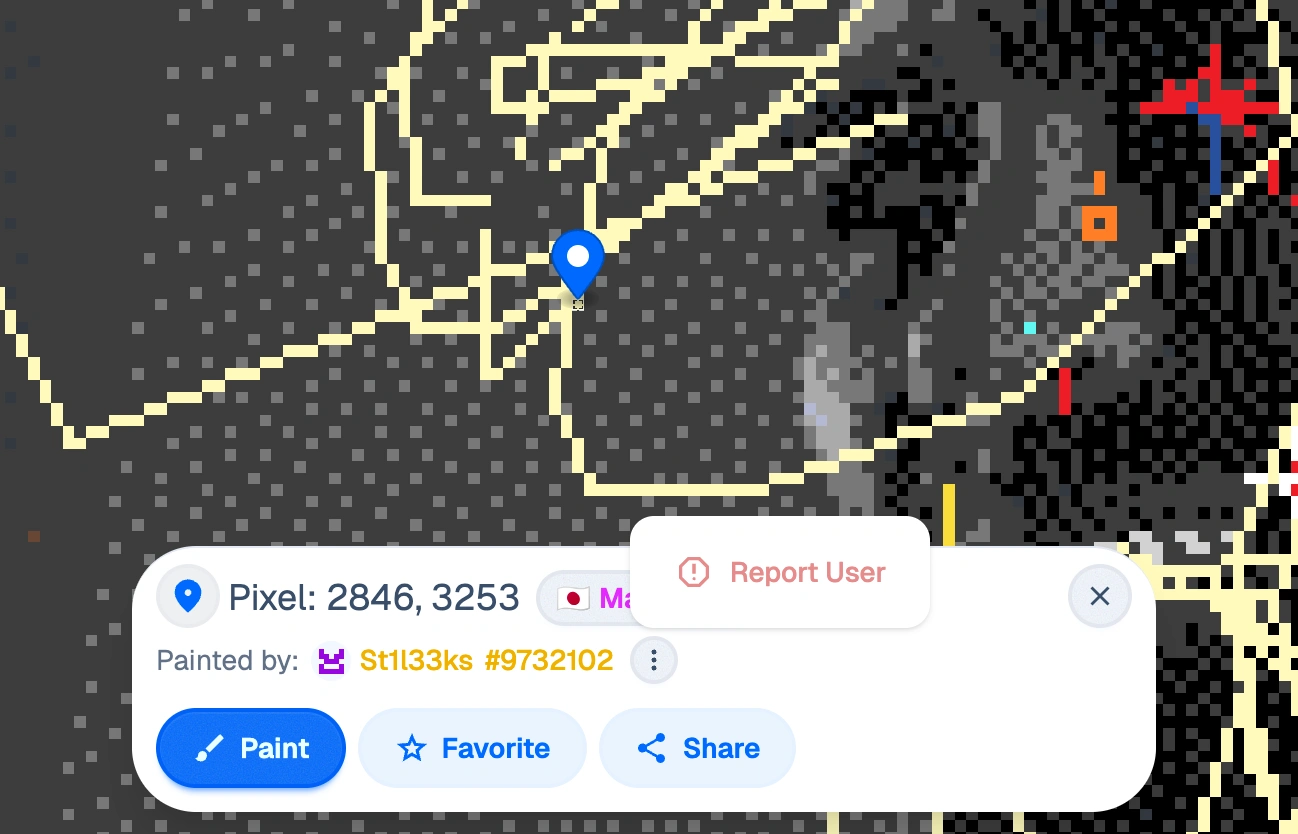
The report button on Wplace has been confirmed by multiple news sources, including ABC News and The Times Leader, as an official feature for flagging serious violations. However, its visibility can vary based on several factors:
Typical locations for the report button:
- Near individual pixels or artwork areas when you hover or click
- In user profile menus (three-dot menu)
- Within the main interface toolbar (may require login)
Visibility conditions that may affect the button:
- Login status (some features require authentication)
- Device type (mobile vs desktop interfaces may differ)
- Browser version or platform compatibility
- Account standing or verification level
If the button is temporarily unavailable: When the report button isn't visible, use the official fallback channel through Wplace's Privacy Policy contact email: wplacelive@gmail.com. Include the same evidence package you would submit through the button interface, with a clear subject line like "Report: [Violation Type] at coordinates [X,Y]".
Note: UI elements may change. This information was verified in September 2025. Always capture timestamped screenshots of your reporting process.
What Counts as a Valid Report? (Categories & Examples)
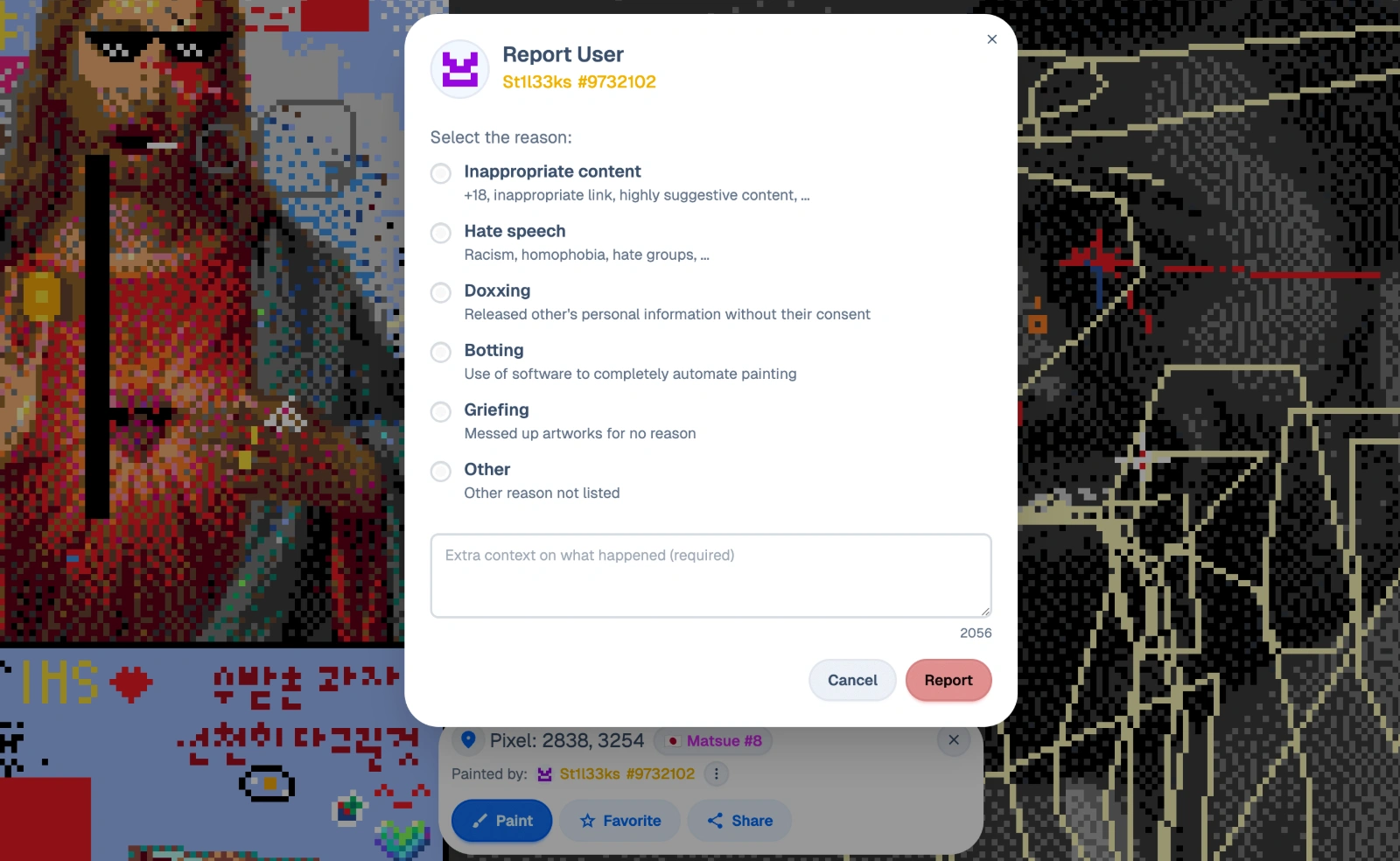
Understanding what constitutes a legitimate violation versus normal creative activity is crucial for effective reporting. For a comprehensive overview of what's allowed versus forbidden, see our detailed Wplace Rules guide. Here are the main categories:
Clearly Reportable Violations:
Hate Speech & NSFW Content
- Racist, sexist, or discriminatory symbols
- Explicit sexual imagery
- Violence-promoting content
- Religious or cultural hate symbols
Privacy Violations & Doxxing
- Personal information displayed without consent
- Real names, addresses, phone numbers
- Private photos or documents
- Revenge-based personal attacks
Automation & Multi-Account Abuse
- Bot-driven pixel placement patterns
- Coordinated attacks from multiple fake accounts
- Scripted or automated drawing tools
- Suspicious rapid-fire placement patterns
Harassment & Targeted Abuse
- Persistent targeting of specific users
- Coordinated griefing campaigns
- Threats or intimidation
- Stalking behavior across the canvas
What Usually Does NOT Qualify:
Creative Repainting/Overwriting
- Artistic disagreements over color choices
- Style preference conflicts
- Normal competitive pixel placement
- Creative interpretations or modifications
Technical Mistakes
- Accidental wrong color placement
- Misunderstanding of artwork intentions
- Lag-related double clicks
- Learning curve errors from new users
Remember: Creative overwriting is explicitly allowed by Wplace's community guidelines. If you're new to Wplace and want to understand how the platform works, check out our What is Wplace guide for beginners. Only report when content clearly violates terms of service.
Evidence Checklist: Make Your Report Actionable (How-To)

Strong evidence makes the difference between actionable reports and dismissed complaints. Follow this systematic approach:
Step 1: Capture Full-Context Screenshots
- Include zoom level indicator in the screenshot
- Show surrounding area for context (don't crop too tightly)
- Capture timestamp from your device or browser
- Include coordinate information (TL X / TL Y positions)
Step 2: Record Precise Coordinates
- Use Wplacemaker's Template tool to identify exact pixel positions
- Note the affected area size (e.g., "15x20 pixel region")
- Record both Top-Left (TL) coordinates and center points
- Include zoom level used when capturing coordinates
Step 3: Document Repeated Behavior (Optional)
- For automation/bot reports: capture 10-20 second video clips
- Show pattern repetition or inhuman speed
- Record multiple instances with timestamps
- Note any suspicious timing patterns
Step 4: Collect Supporting Information
- Profile links of involved accounts
- Links to witness comments or discussions
- Screenshots of related harassment in other areas
- Previous incident documentation if part of ongoing issue
Step 5: Write Clear Description
- What happened (specific actions)
- Where it happened (exact coordinates)
- When it happened (date/time with timezone)
- Who was involved (usernames if visible)
- Why it violates rules (specific policy reference)
Pro Tips:
- Keep raw, unedited originals of all evidence
- Don't crop away important context
- Use Wplacemaker's Extension for safe coordinate capture
- Document everything before the content gets modified
Submit Your Report (Button Flow & Fallback)
Primary Method: Report Button Flow
- Open the report interface by clicking the report button near the violating content
- Select the appropriate category from the dropdown menu (hate speech, harassment, automation, etc.)
- Upload your evidence including screenshots, coordinates, and description
- Review your submission for accuracy and completeness
- Submit the report and note any confirmation number provided
Quality Guidelines:
- Submit one incident per report (don't bundle multiple issues)
- Avoid duplicate reports for the same incident
- Keep follow-up updates in the same report thread when possible
- Be factual and objective in your descriptions
Fallback Method: Email Contact
When the report button is not available, use the official Privacy Policy contact:
Email: wplacelive@gmail.com
Subject Line: Report: [Violation Type] at coordinates [X,Y]
Body Template:
Report Type: [Hate Speech/Harassment/Automation/Privacy/Other]
Location: TL X: [coordinate] TL Y: [coordinate]
Date/Time: [timestamp with timezone]
Description: [Brief factual description]
Evidence: [List attached files]

[Detailed explanation of violation and why it breaches ToS]
Important: This email is listed in Wplace's Privacy Policy as a contact method. While primarily for privacy concerns, it serves as the official fallback for serious reports when other channels are unavailable.
If You're the Target: Safety & Escalation
If you're being targeted by harassment, doxxing, or threats on Wplace, prioritize your safety:
Immediate Steps:
- Preserve evidence first - screenshot everything before it gets removed
- Hide sensitive information - don't publicly share your coordinates or location
- Document the timeline - record when incidents occurred
- Avoid public confrontation - don't engage directly with harassers
When to Escalate Beyond Wplace:
- Credible threats of violence - contact local law enforcement
- Doxxing with real-world implications - document for potential legal action
- Persistent harassment affecting your life - consider platform-independent solutions
- Privacy breaches involving minors - report to appropriate authorities
Evidence Preservation:
- Keep copies of all screenshots and communications
- Document any real-world impacts or concerns
- Maintain a chronological log of incidents
- Save any witness statements or supporting information
Remember: Your safety comes first. Platform reporting is important, but serious threats may require external intervention.
Appeals: What If Moderation Gets It Wrong?
Sometimes legitimate reports get dismissed, or you might face wrongful action against your account. Here's how to appeal effectively:
When Appeals Are Appropriate:
- Your report was dismissed but clear violations remain
- You received a penalty for legitimate creative activity
- Evidence wasn't properly considered in the original review
- New evidence has emerged since the original decision
Strong Appeal Package:
- Original evidence with timestamps and coordinates
- Additional documentation that wasn't available initially
- Clear timeline of events leading to the decision
- Specific policy references explaining why the decision was incorrect
- Factual, respectful tone avoiding emotional language
Appeal Process:
- Gather comprehensive evidence including your original report
- Draft a clear, factual summary of why the decision should be reconsidered
- Submit through the same channel used for the original report
- Include "APPEAL" in the subject line to distinguish from new reports
- Wait for response before submitting follow-ups
Timeline and Etiquette:
- Allow reasonable time for review (typically 3-7 business days)
- Send only one follow-up if no response after a week
- Avoid spam-submitting multiple appeals for the same issue
- Keep communication professional and fact-based
Sample Appeal Email Subject: "APPEAL: Report #[ID] - [Brief description]"
FAQ
1) Does Wplace have an official report button?
Yes, multiple news sources including ABC News have confirmed Wplace has an official report button for flagging serious violations. If it's temporarily not visible, use the fallback channel (wplacelive@gmail.com) and include full evidence with coordinates.
2) What should I report vs not report?
Report: Hate speech, NSFW content, doxxing/privacy breaches, bot/multi-account abuse, illegal content, targeted harassment.
Don't report: Creative repainting/overwriting, color disagreements, style preferences, or accidental mistakes. Creative overwriting is explicitly allowed.
3) Where do I find coordinates for evidence?
Use Wplacemaker's Template or Extension tools to capture TL X / TL Y coordinates and pixel positions. Include zoom level and timestamp. These tools help you safely gather coordinate data without automation.
4) How do I report doxxing or hate speech?
Choose the matching category in the report form, attach original screenshots with coordinates and timestamps, and provide a concise factual description. Include context but avoid sharing the sensitive information publicly.
5) Is automation/bots bannable?
Yes, automation and multi-account abuse are typically prohibited by Wplace's Terms of Service. Provide video evidence of repeated patterns, timestamps, account links, and coordinate data to support your report.
6) How do I appeal a wrongful ban or removal?
Prepare an appeal with evidence, timeline, and specific policy references. Send via the same channel used for the original report with "APPEAL" in the subject line. Include logs, coordinates, and clips proving manual (non-automated) activity.
7) What if reports go unanswered for a while?
Send a single, well-documented follow-up after a reasonable waiting period (3-7 days) or use the fallback email channel. Avoid duplicate spam reports, which can reduce the effectiveness of the reporting system.